前言

之所以学习 Mips 指令集的解码流程是因为某 VMP 使用到了 Mips 魔改的指令集,并且需要新增 BN 对于 Mips 指令的 Lift,本文将结合 Mips 指令集文档以及 BinaryNinja Mips 架构插件解构 Mips 指令集的解码流程。本文讨论的解码流程基于标准 MIPS32 / MIPS64 指令集,不涉及 MIPS16、microMIPS、nanoMIPS 等压缩编码模式。

Mips 解码流程

经典 MIPS(MIPS I–V、MIPS32、MIPS64,包括 R6)的标准指令使用 32-bit(4 字节)定长编码,并且 Mips 指令集的解码并不是单纯的根据 opcode 查找指令表的过程,而是按照字段分层分发(实际上就是不同的指令族进行分发,不同的指令族解码过程也不相同)的一个过程。之所以要这样设计是因为随着指令数量的增长,单层的查找指令表无法满足指令数量,比如 bits[31-26]只有 6 位,也就是只能够支持 64 条指令。

第一次分发

首次解码一定会获取 bits[31-26],后续基于这 6 位进行分发

某些指令只需要一次分发即可完成解码,比如 DADDIU、DADDI 等,在架构书中可以看到 bits[31-26]标上 DADDI,表明第一次分发即可完成解码,其中 bits[25-21]为 rs,即源寄存器;bits[20-16]为 rt,目标寄存器;bits[15-0]为 imm,表示立即数
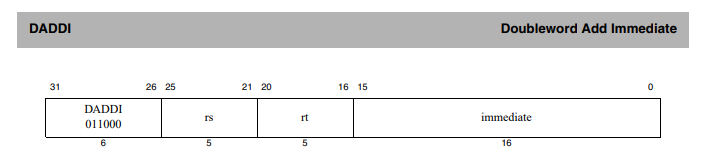
image-20260117220219622

第二次分发

第二次分发会产生不同的路径,以下是 Mips 指令集的一些常见分发路径

SPECIAL(opcode = 0)

此时会 funct(bits[5:0])作为子 opcode,比如 DADDU 的 bits[31-26]为 0x0,对应 SPECIAL,此时取 bits[5-0]作为子 opcode,101101 表明当前指令为 DADDU,接着根据 DADDU 指令的解码规则取寄存器 index
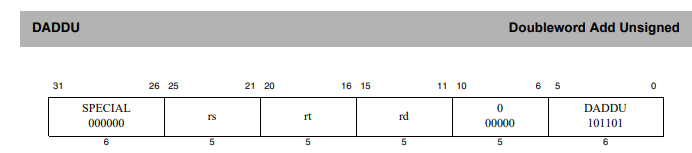
image-20260117221901421

REGIMM(opcode = 1)

这类指令族会取 bits[20-16]作为子 opcode
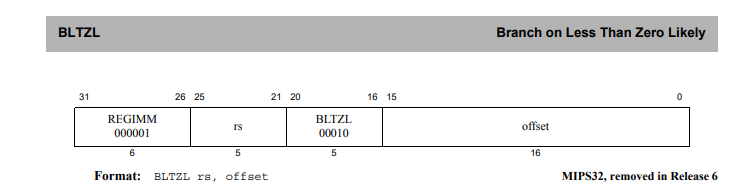
image-20260117222711646

COP0 / COP1 / COP2(opcode = 16/17/18)

COP 指令族采用多级分发机制。第一次分发由 opcode 确定协处理器类型,第二次分发通常由 rs 字段(bits[25-21],在 COP1 中称为 fmt)决定指令子类
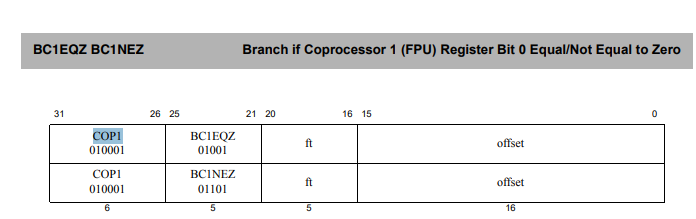
image-20260117231812442

SPECIAL2 / SPECIAL3(opcode = 28/31)

SPECIAL2 / SPECIAL3 不是新格式,而是 opcode 空间不足后的“额外 R-Type 池”。取 bits[5-0]作为子 opcode
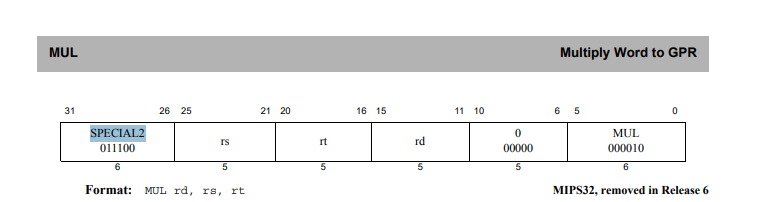
image-20260117224704746

第三次分发

在 COP 的某些子类中会继续使用 bits[5-0](funct)进行第三层分发
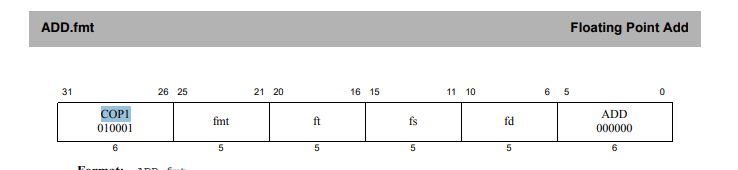
image-20260117231946796

在 MIPS Release 6 中,为了移除 HI/LO 相关指令并引入更紧凑的编码方式,部分指令采用了更复杂的字段组合来区分具体语义。
此时解码过程可能需要在 opcode 和 funct 之后,结合 shamt 或其他字段进一步区分指令子类。比如下图首先会取 bits[31-26]做第一次分发,bits[5-0]做第二次,最后 bits[10-6]做第三次分发
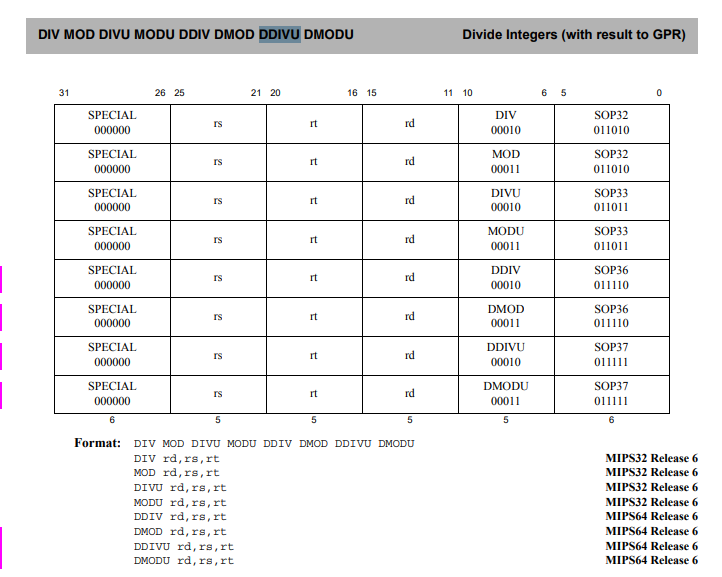
image-20260117225337951

BinaryNinja Arch Mips 解码

其实没什么好分享的,只需要参考上面的解码流程分析mips_decompose_instruction函数即可,该函数同样会对机器码进行解析并进行不同层次的分发,下面是第一次分发,ps:如果把 case 0 这种换成宏定义看着会更清晰,代码中通过mips_special_table[version-1][ins.decode.func_hi][ins.decode.func_lo]本质上和mips_special_table[func_t]是一样的

1
2
3
4
5
6
7
8
9
10
11
12
13
14
15
16
17
18
19
20
21
22
23
24
25
26
27
28
29
30
31
32
33
34
35
36
37
38
39
40
41
42
43
44
45
46
47
48
49
50
51
switch(ins.value >> 26)
{
case 0:
instruction->operation = mips_special_table[version-1][ins.decode.func_hi][ins.decode.func_lo];
if (instruction->operation == MIPS_INVALID && version == MIPS_R5900)
instruction->operation = MIPS_ADDI;
break;
case 1:
instruction->operation = mips_regimm_table[version-1][ins.decode.rt_hi][ins.decode.rt_lo];
break;
case 0x1c:
if (version == MIPS_32)
instruction->operation = mips32_special2_table[ins.decode.func_hi][ins.decode.func_lo];
else if (version == MIPS_64)
{
if ((flags & DECOMPOSE_FLAGS_CAVIUM) == 0)
instruction->operation = mips64_special2_table[ins.decode.func_hi][ins.decode.func_lo];
else
{
instruction->operation = cavium_mips64_special2_table[ins.decode.func_hi][ins.decode.func_lo];
if (instruction->operation == CNMIPS_CVM)
{
switch (ins.r.sa)
{
// note that CN50xx docs don't include these instructions, but they are
// listed in the SDK (bootloader/u-boot/mips/include/asm/inst.h)
case 0x1c: instruction->operation = CNMIPS_ZCB; break;
case 0x1d: instruction->operation = CNMIPS_ZCBT; break;
default: return 1;
}
}
}

}
else if (version == MIPS_R5900)
instruction->operation = mips_mmi_r5900_table[ins.decode.func_hi][ins.decode.func_lo];
break;
case 0x1f:
if (version == MIPS_32)
instruction->operation = mips32_special3_table[ins.decode.func_hi][ins.decode.func_lo];
else if (version == MIPS_64)
instruction->operation = mips64_special3_table[ins.decode.func_hi][ins.decode.func_lo];
else if (version == MIPS_R5900)
instruction->operation = mips_base_table[version-1][ins.decode.op_hi][ins.decode.op_lo];
break;
default:
if ((flags & DECOMPOSE_FLAGS_CAVIUM) == 0)
instruction->operation = mips_base_table[version-1][ins.decode.op_hi][ins.decode.op_lo];
else
instruction->operation = cavium_mips_base_table[ins.decode.op_hi][ins.decode.op_lo];
}

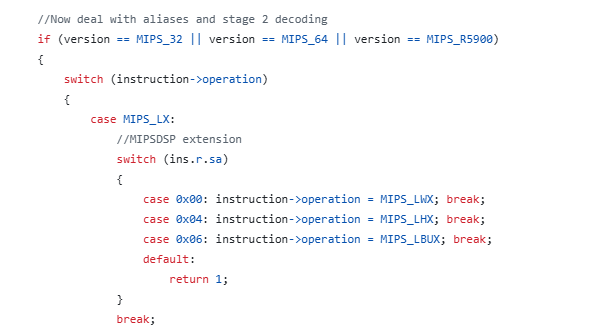
第二次解码如下,太长了就不贴了

image-20260117225952685

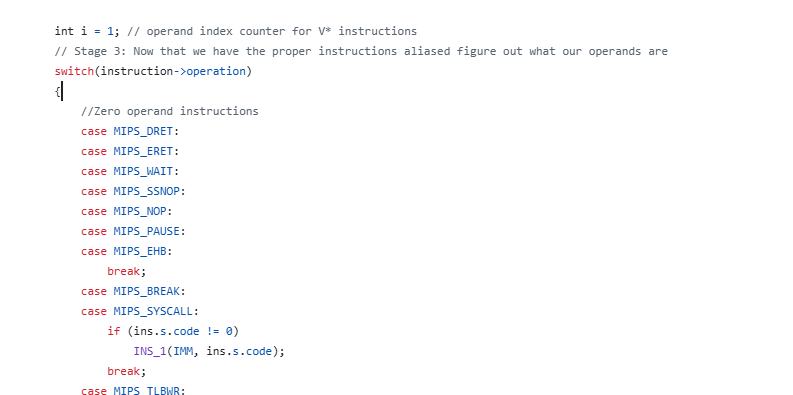
经过第二次分发之后就开始根据不同的指令来取出操作数

image-20260117230214574

BN 目前针对 Mips R6 的 DDIVU 指令是无法汇编和 Lift 的,有兴趣的朋友可以尝试下通过 keystone 编译后通过 BN 反汇编,顺带提一嘴,由于 Keystone 很久没更新,而 keystone 是基于 llvm 的,llvm 已经支持 Mips R6,因此可以手动支持编译下,参考https://github.com/keystone-engine/keystone/pull/587

参考资料

https://github.com/Vector35/binaryninja-api/tree/dev/arch/mips

http://s3-eu-west-1.amazonaws.com/downloads-mips/documents/MIPS_Architecture_MIPS64_InstructionSet_%20AFP_P_MD00087_06.05.pdf